
Skip to content
New Watcher and Agent workflows — OrbitWix AI

One Business.
One Connected Orbit.

Connect sales, purchasing, inventory, trade, dispatch, logistics and finance around one business operating platform.

Built to start simple. Designed to scale with your business.

  • Sales
  • CRM
  • Purchase
  • Inventory
  • Warehouse
  • Trade
  • Dispatch
  • Logistics
  • Fleet
  • Finance
  • Accounting
  • Point of sale
  • HR
  • Projects
  • Manufacturing
  • Quality
  • Analytics
  • AI & automation

Why one platform

Your business shouldn’t operate in disconnected systems.

Businesses often grow by adding tools — one for accounting, another for inventory, another for sales, another for dispatch, and spreadsheets everywhere. OrbitWix connects them around one shared business core, so sales, purchasing, inventory, trade, dispatch, logistics and finance read and write the same records.

Today: five tools, five versions of one customer
  • Accounting

    Grant Traders

  • Inventory

    Grant Trader

  • Sales

    GRANT TRADERS LTD

  • Dispatch

    Grant Trdrs, Chennai

  • Spreadsheets

    grant traders (old)

  • Duplicate data entry across disconnected tools
  • Manual reconciliation across spreadsheets
  • Delayed decisions from limited visibility
With OrbitWix: one record, read by every app
  • Sales
  • Inventory
  • Dispatch
  • Finance
  • Trade

Core OS · central master data

Grant Traders Verified

  • Central master data, entered once
  • Structured workflows and approvals
  • Real-time visibility across operations

Inside OrbitWix

Every department, one connected workspace.

The same customers, items and documents run through every app. Here is what each team works in.

  1. Sales

    From quotation to order, without retyping.

    Quotations convert to sales orders in one step, carrying prices, terms and taxes with them. Credit limits and approvals apply before anything ships.

    Explore Sales
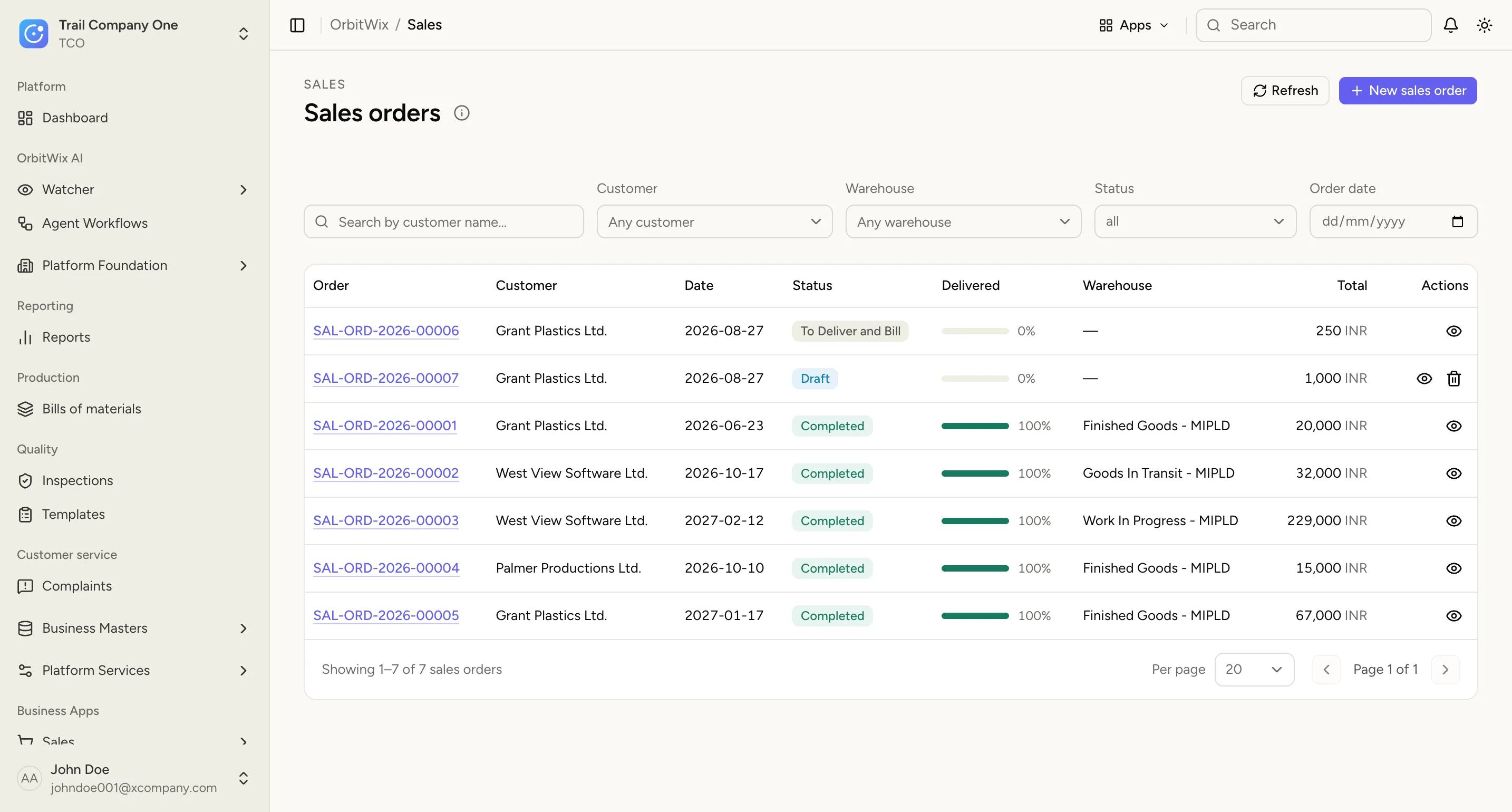
    Sales orders in OrbitWix: each order with its customer, status, delivery progress, warehouse and total.
  2. Inventory

    Stock you can trust, in every warehouse.

    Every receipt, transfer and delivery posts to one stock ledger, so on-hand quantities are live across branches and warehouses — not a nightly sync.

    Explore Inventory
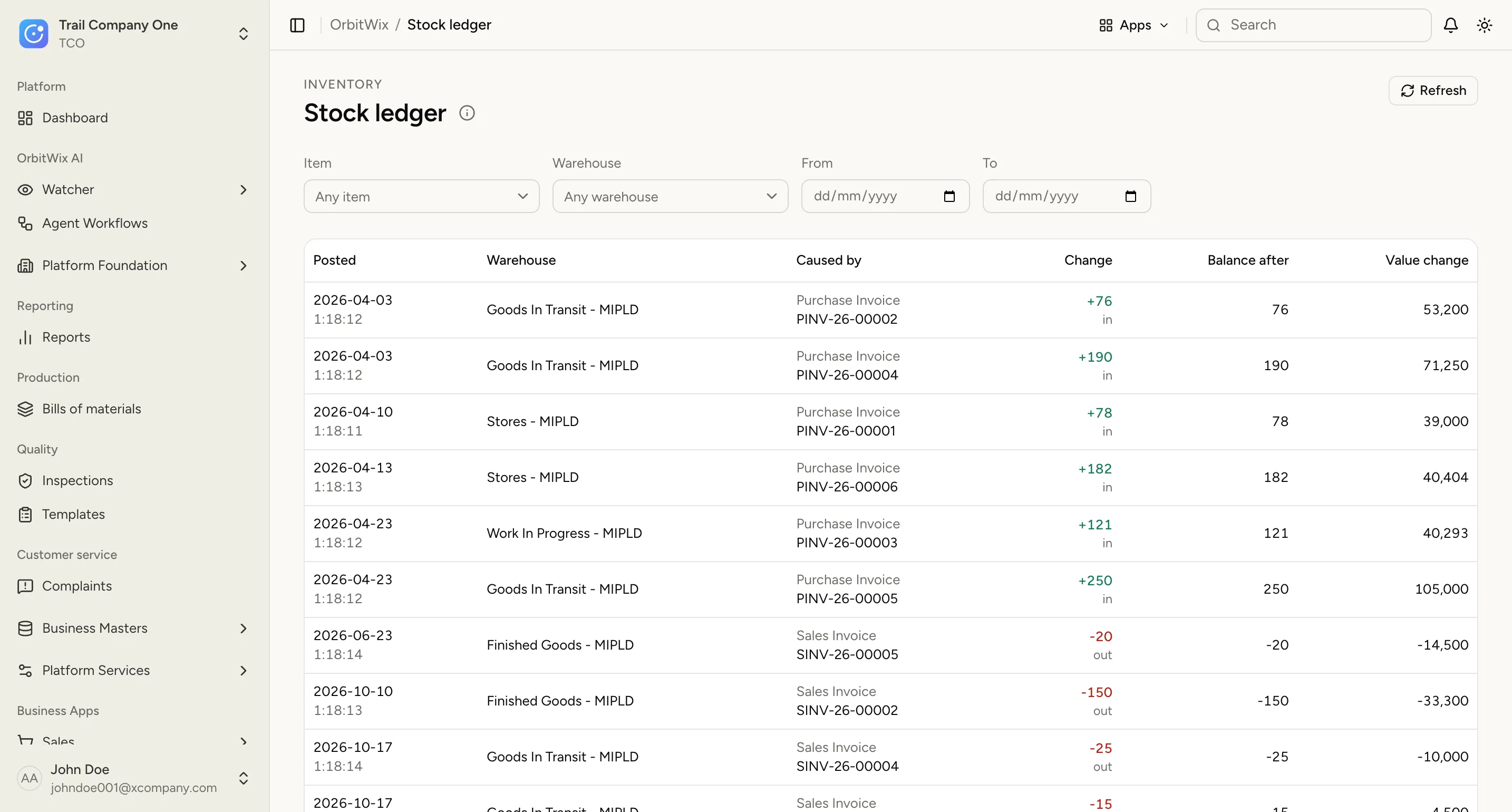
    The stock ledger: every receipt and issue by warehouse, with the document that caused it, the balance after and the value change.
  3. Purchase

    Buy against real demand.

    Material requests, supplier quotations, purchase orders and receipts link end to end, so you can see what was ordered, what arrived and what is still owed.

    Explore Purchase
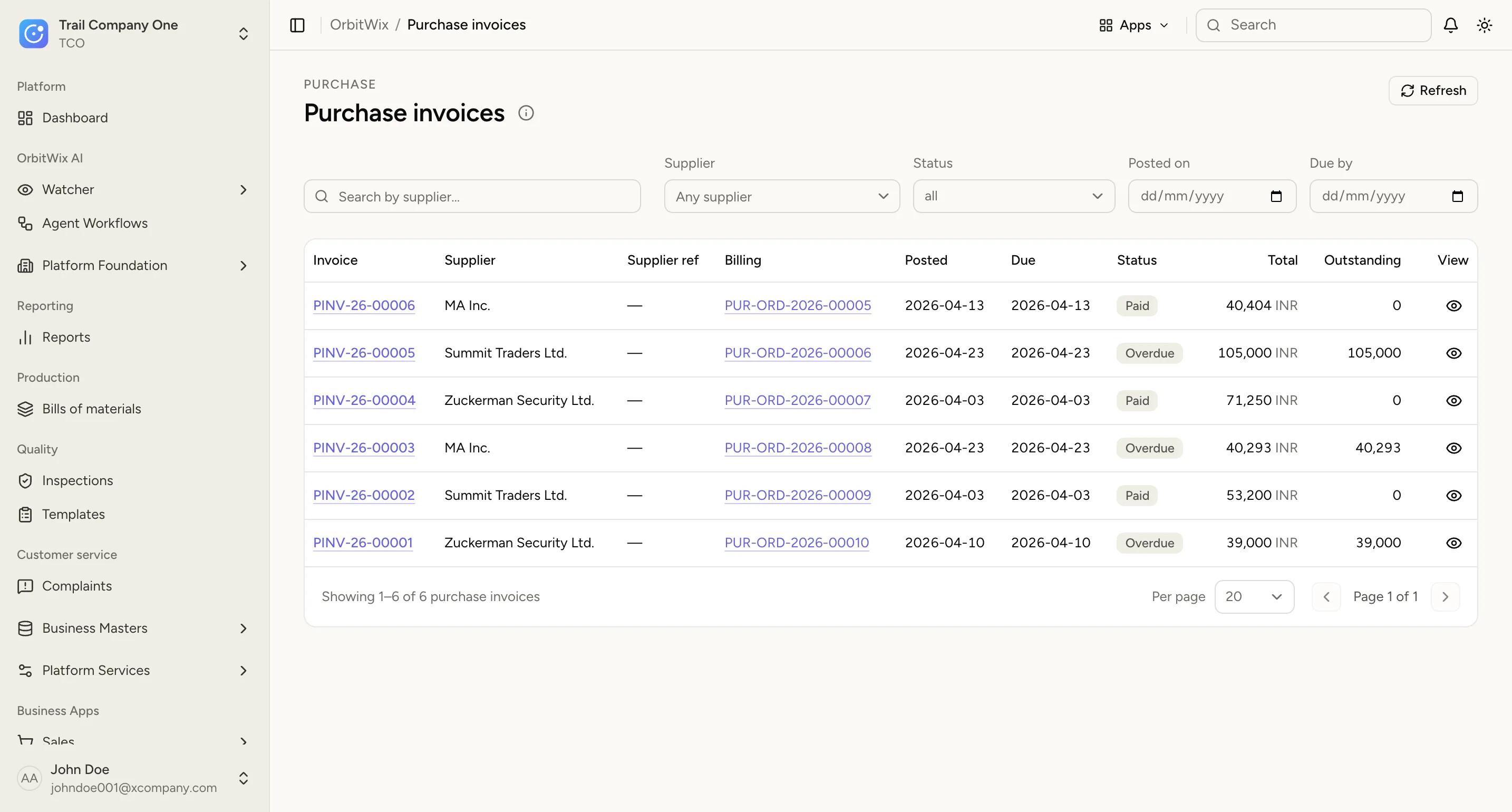
    Purchase invoices linked to their purchase orders, with supplier, due date, status and outstanding amount.
  4. Dispatch & logistics

    Know where every order is.

    Plan dispatches from confirmed orders, track them through delivery, and keep proof of delivery on the same record the customer was billed from.

    Explore Dispatch
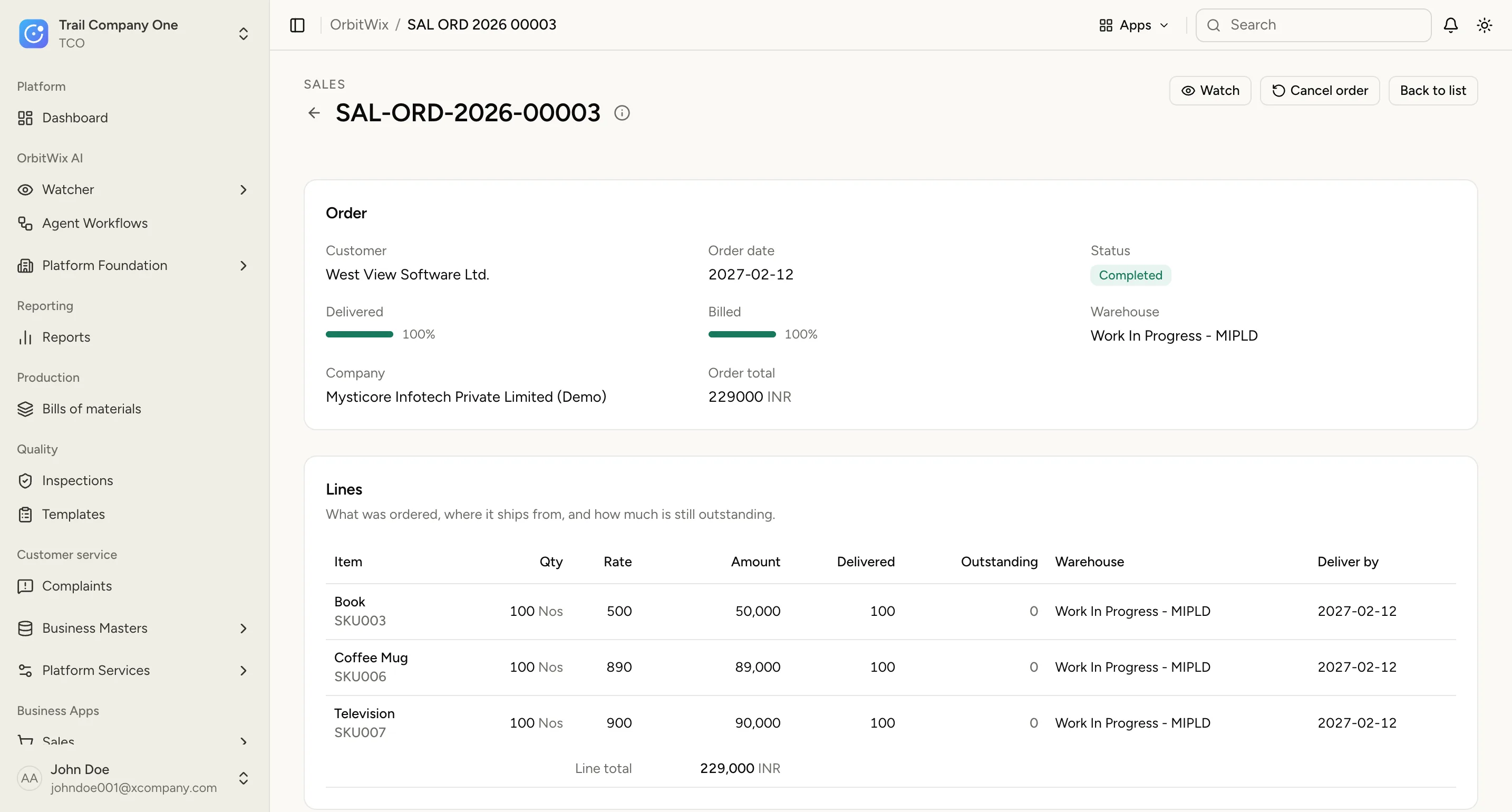
    A completed sales order: 100% delivered and billed, with each line's delivered quantity, warehouse and delivery date.
  5. Finance

    Invoices and payments that match the warehouse.

    Invoices raise from what was actually delivered, payments allocate against them, and receivables stay current without a month-end reconciliation.

    Explore Finance
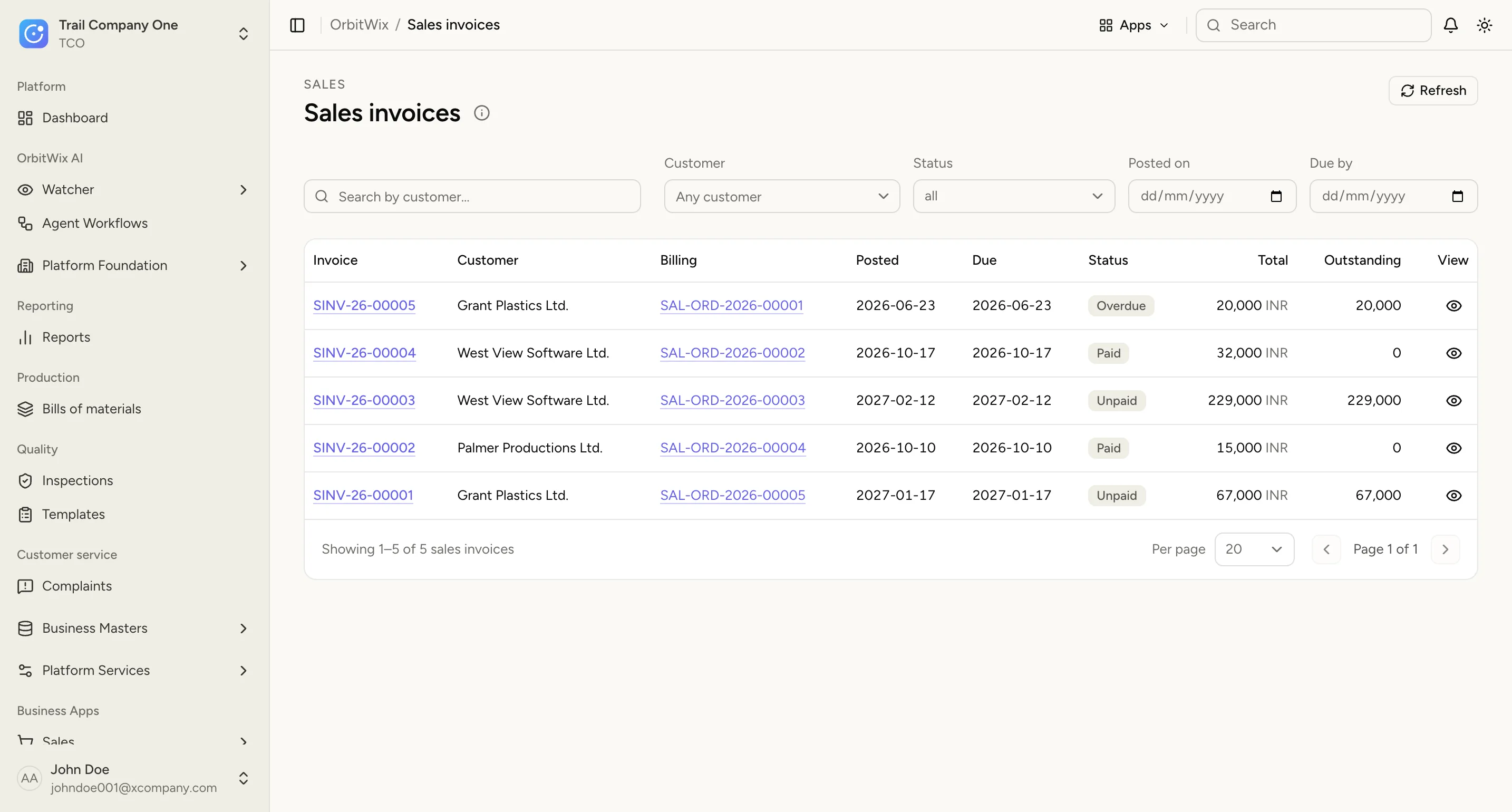
    Sales invoices with customer, linked order, due date, paid, unpaid or overdue status, and outstanding amount.
  6. Reports

    One view of the whole business.

    Sales, stock, dispatch and receivables report from the same records, so the numbers in a meeting are the numbers in the warehouse.

    Explore Core OS
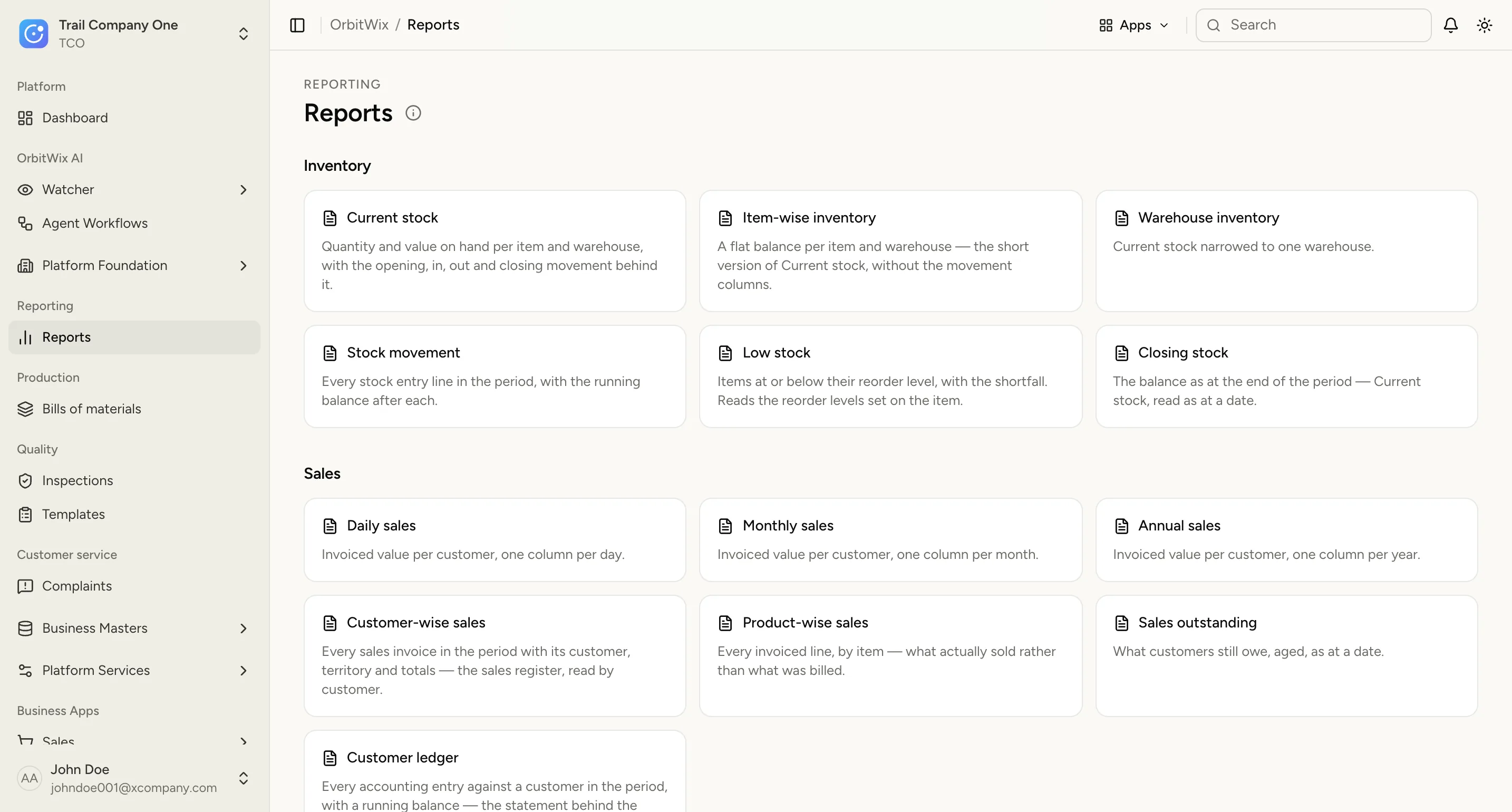
    The reports catalogue: current stock, stock movement, low stock, and daily, monthly and customer-wise sales.

Business workflow

From order to delivery, every movement connected.

One order for Grant Traders, followed from the first quote to the last payment. Each document is raised from the one before it, so nothing is typed twice and every step links back to the order.

One sale in six linked documents: quotation, sales order, delivery note, dispatch, sales invoice and payment.
  1. Quotation

    QTN-2026-0092

    Accepted

  2. Sales order

    SO-2026-0148

    Confirmed

  3. Delivery note

    DN-2026-0233

    Packed

  4. Dispatch

    DSP-2026-0057

    Delivered

  5. Sales invoice

    INV-2026-0311

    Issued

  6. Payment

    ₹ 84,500.00

    Received

How OrbitWix works

Core OS first. Everything you add works from it.

Every customer starts with the Core OS. Activate the apps the business runs today, and add the rest as it grows — no rebuilding, no second copy of the data.

Core OS — included with every account

Explore Core OS
  • Organizations, companies and branches
  • Users, teams, roles and permissions
  • Central master data
  • Workflow and approval engine
  • Documents and activity history
  • Notifications and business events
  • Audit and configuration

Connect the systems you already use.

An external system writes to the same records your own apps do.

  • E-commerce
  • Payment gateways
  • Shipping providers
  • WhatsApp & notifications
  • APIs & webhooks

OrbitWix AI

AI that keeps watch, and agents that do the legwork.

Tell OrbitWix what matters on a record. It watches, notices, explains what it found — and leaves the decision to you. Because every app writes to the same records, the AI reads the business as it is, not an export from last week.

Watcher Early access

Put a watch on any order, invoice, customer, item or warehouse. OrbitWix keeps an eye on it and tells you when something needs attention — with the facts that made it notice. A watch observes and notifies; it never changes a business record.

  • Six kinds of rule, from deadlines to inactivity
  • Several rules on one watch
  • Start a watch from the record you are looking at
  • Every observation links back to its record

Agent workflows Early access

Draw the process on a canvas: what starts it, which record it reads, the decisions it makes, where an AI agent investigates and where a person approves. No code — and nothing goes out without the approval step you put in.

  • Start on demand, on a schedule, from a watch or a business event
  • Agents investigate and report on your live records
  • A person signs off before anything is sent
  • Validate and test a run, then publish a version
  • Inventory forecasting

    Demand read from live movement, not a monthly export.

  • Predictive replenishment

    Reorder points that follow real consumption.

  • Analytics

    One reporting surface over every app.

Who it’s for

Built for businesses that make and move goods.

Trading, distribution and manufacturing operations, where one order passes through purchasing, stock, documentation, dispatch and finance — from a small trading business to a multi-company group.

At every stage of business

  1. 1Small business. Start simple: Core OS plus selected apps.
  2. 2Growing. Connect sales, purchasing, inventory, finance and execution.
  3. 3Mid-market. Add trade, warehouse, dispatch, logistics, fleet and intelligence.
  4. 4Enterprise. Multiple companies, branches and integrations.

Why OrbitWix

Built to be trusted with your operations.

The difference is not the number of modules. It is what sits underneath them.

  • A proven accounting core

    Every app posts to one double-entry ledger and one stock ledger, so the books and the warehouse always agree.

  • Your company, your own site

    Each organization runs on its own isolated instance. Your records never share a database with another customer’s.

  • Access by role, checked on the server

    Users see only the apps and records their role allows, and every request is checked before it reaches your data.

  • Nothing quietly rewritten

    A submitted document is cancelled and amended, never silently edited, and its history of changes stays with it.

  • Modular, so you start small

    Begin with the Core OS and the apps you run today. Add more when the business needs them, without rebuilding.

  • Open to your other systems

    Integrations write through the same layer as the apps, so an outside system never holds a second copy of the truth.

FAQ

Common questions about OrbitWix.

Have a different question? Talk to us.

What is OrbitWix?

OrbitWix is an all-in-one business management platform that connects trade, inventory, dispatch, logistics, finance and automation around a single Core OS, so every part of your business shares the same information instead of operating in separate tools.

How much does OrbitWix cost?

Pricing depends on which apps and modules your business needs, so we don’t publish a fixed price list. Book a call with us and we’ll walk through your requirements and put together pricing that fits your business.

Do I have to activate every app, or can I start small?

You can start with just the Core OS and add apps like Trade, Dispatch, Logistics or Finance only when your business needs them — no rebuilding required as you grow.

What is the Core OS?

The Core OS is the shared foundation every OrbitWix customer starts with. It covers organizations, users and permissions, master data, workflows, documents and notifications, so every app you add works from the same shared foundation.

Is OrbitWix suitable for a small business, or only larger enterprises?

OrbitWix is built for every stage of business. Small businesses can start simple with the Core OS and a few apps, while growing, mid-market and enterprise businesses can add trade, warehouse, dispatch, logistics, fleet and intelligence as they scale.

Does OrbitWix cover trade and logistics, not just accounting and inventory?

Yes. OrbitWix connects the full flow from order to delivery — trade documentation, dispatch, transportation, shipment, delivery and finance — into one connected operational chain, not just standard accounting and inventory.

How do I get started?

Talk to us and we’ll help you map the right Core OS and apps for your business.

Build your business around one connected platform.

Start with the Core OS. Add the applications you need. Connect the systems you already use. Grow into the platform your business needs next.